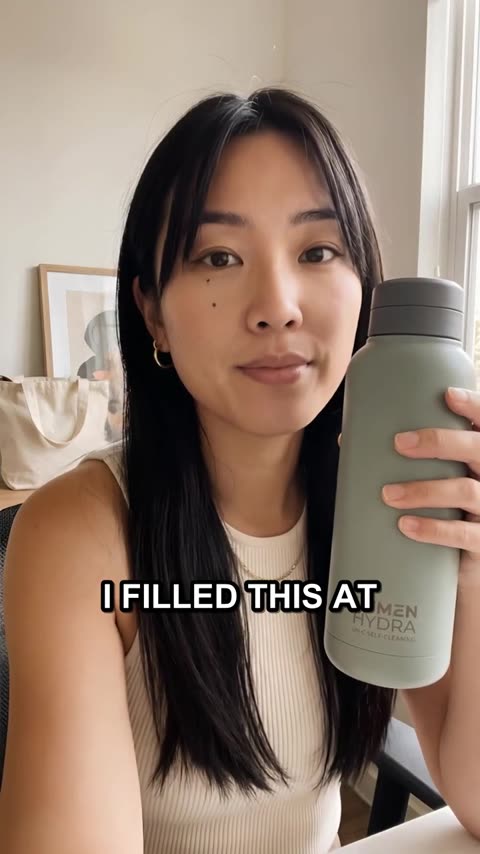
User-generated content (UGC) ads look like a real person recommending a product to a friend: a phone camera, a kitchen or a car, a casual voice, the product in hand. They work because they don't look like ads. The problem has always been production: finding creators, shipping products, waiting for footage, paying for usage rights, then doing it all again for the next test.
AI changes the economics. This guide shows how to make UGC ads with AI, step by step, and how to keep the things that make UGC work.
What makes a UGC ad work (AI or not)
Before any tool, get the ingredients right. Strong UGC ads share five traits:
- A hook in the first three seconds that names a person, a moment or a surprising result.
- A specific problem. "Tight skin by lunch," not "skin issues."
- The product in use, shown rather than described.
- Believable proof: a result, a demonstration or an honest detail.
- A clear next step: what to do and why now.
AI makes producing these faster. It doesn't replace knowing what to say. If you skip the thinking, you'll just make bad ads faster.
Step 1: Write a one-paragraph brief
Everything downstream is better with a clear brief. Answer five questions:
- Product: what is it, and what are its three real benefits?
- Audience: who exactly, in what moment of their day?
- Problem: the specific frustration your product removes.
- Proof: what can you show or say that's true and convincing?
- Offer: what do you want people to do, and is there a reason to do it now?
If you sell a physical product, import it first. In Larkroot you paste your product page and the details, benefits and photos fill in. Its real photos then go along with every picture and video so the packaging looks right.
Step 2: Choose a proven structure
Don't start from a blank page. Start from what's already working:
- Borrow a structure from a winning ad. Find long-running ads in your category (our Meta Ad Library guide shows how), then follow their beat structure with your own words. See how to do that without copying.
- Or use a classic UGC format: selfie review, problem → solution demo, day in the life, unboxing, or "3 reasons I switched."
Step 3: Write the script around the hook
A 15 to 30 second UGC script follows a simple rhythm:
| Beat | Time | Example (insulated bottle) |
|---|---|---|
| Hook | 0–3 s | "If your coffee's cold by 9am, it's your mug, not your commute." |
| Problem | 3–7 s | "Two trains, a walk, and most travel mugs leak or go lukewarm halfway." |
| Product | 7–15 s | "This one's double-walled and the lid locks shut, so it goes in your bag upside down." |
| Proof | 15–22 s | Flips the bottle, shakes it: nothing leaks. On screen: "Hot for 12 hours" (only if your spec says so). |
| Call to action | 22–27 s | "It's on sale this week. Link's right here." |
Write how people talk: short sentences, contractions, no marketing words. Read it out loud. If it sounds like an ad, rewrite it. For openings, browse our 24 hook formulas.
Notice what the example doesn't do: the presenter never claims to have used the bottle for a month. With an AI presenter, show and explain; don't invent personal experience. Save first-person stories for real customers and real creators.
Step 4: Pick a consistent creator
Your presenter is half the ad. Choose:
- A persistent AI creator: the same face and voice in every ad, so viewers recognize them over time. Design one once (face, voice, personality, bio) or start from a library. See how to create an AI creator for your brand.
- No presenter: AI video of the product in use, with on-screen text and music or a voiceover. Faster and cheaper, and good for demos.
Whatever you choose, keep it believable: a setting that fits the person, natural movement, and the product handled the way people really use it.
Step 5: Film it
This is where the AI does the heavy lifting. A good AI UGC tool should:
- Film talking videos in one continuous take, with natural speech, lip sync and room sound, not a choppy stitch of clips.
- Keep the product accurate, using your real product photos as references.
- Keep the creator consistent from shot to shot and ad to ad.
- Show the price before it runs, so there are no surprise bills.
Comparing tools? Our guide to the best AI UGC ad tools covers seven of them, with prices checked on each vendor's site.
In Larkroot, a typical 15-second talking UGC ad costs about 430 credits ($4.30) in standard quality, all in: script, filming, voice and captions. Longer or HD videos cost more, and the exact price is shown and approved before anything is made.
Step 6: Add captions people actually read
Many people watch with the sound off. Captions aren't optional:
- Time them to every word, so they follow the speech.
- Pick a style that matches the brand: word highlight, bold "Hormozi" style, or karaoke.
- Keep them away from the edges, where platform buttons cover them.
Step 7: Review like a skeptic
Before anything goes live, watch it three times:
- Sound off. Does the hook still work? Does the text tell the story?
- As a stranger. Is it obvious what the product is and why it matters within ten seconds?
- As a lawyer. Is every claim true? Is the product accurate? Does anything imply a real customer review that didn't happen?
If one part is off, fix that part rather than starting over. Larkroot lets you fix part of a video and keep the rest.
Step 8: Make versions, then test
Your first ad is a hypothesis. Turn it into a test:
- Three to five hooks on the same body. This is the highest-leverage test.
- Two lengths: the full version and one about a third shorter.
- Two presenters or settings, once you've found a hook that works.
In Larkroot, a new hook, creator, length or voice for a finished video is a variation, not a new production. Then post it, schedule it, or run it straight away as a Facebook and Instagram ad from the same place.
Make a talking UGC ad with your product, then test new openings, creators and lengths without starting over.
AI UGC vs hiring creators: when to use which
AI isn't always the answer. A quick guide:
| Use AI UGC when... | Hire a real creator when... |
|---|---|
| You need many versions to test | You need a genuine customer's experience |
| You want the same face across a campaign | The creator's own audience is the point |
| Speed matters (launches, trends, offers) | The product needs hands-on, real-world proof |
| Budget is tight | Your category is highly regulated |
Many brands do both: real customers for testimonials, AI for the volume of creative that modern ad platforms reward. Our UGC cost breakdown compares the numbers.
Be transparent
AI creators can present and demonstrate. They can't be customers. Never script an AI presenter to claim they've used your product for weeks or to give a "review." That's a fake testimonial. Follow each platform's rules for labelling realistic AI content. Our AI ad disclosure guide covers Meta, TikTok, the FTC and the EU.
Done right, AI UGC gives you what used to need a creator network and an agency: a steady flow of native-looking ads you can test every week.
Frequently asked questions
Can you make UGC ads with AI for free?+
Many tools have a free trial. Making video with AI costs real compute, so finished video ads are rarely free forever. In Larkroot you can try the cheaper parts free, and a typical 15-second talking UGC ad costs about 430 credits ($4.30) in standard quality, with the exact price shown before anything is made.
Do AI UGC ads actually convert?+
They can, when they follow what makes UGC work: a strong hook, a specific problem, the product shown in use, and believable proof. Performance depends on the creative, the offer and the audience more than on how the video was made. Test several versions against your current ads and let the results decide.
How long should a UGC ad be?+
Most short-form UGC ads land between 15 and 30 seconds. Shorter versions often work for retargeting and simple products, while products that need explaining may need longer. Test lengths: it's one of the easiest variables to change.
Do I have to label AI UGC ads?+
Often, yes. Platforms like TikTok and Meta have rules for realistic AI-generated content, and AI presenters must never pose as real customers giving testimonials. See our guide to AI ad disclosure rules for the details.
What's the difference between AI UGC and an AI avatar video?+
Classic AI avatar videos show a presenter reading a script in front of a static background. AI UGC aims for the look and feel of creator content: a phone-camera feel, natural settings, movement, the product in hand, and casual delivery. That's what makes it work in a feed.
Script, filming, voice and captions in one place, with a consistent AI creator and your real product. A 15-second talking ad typically costs about 430 credits ($4.30), shown before anything is made.